
Logo Grider
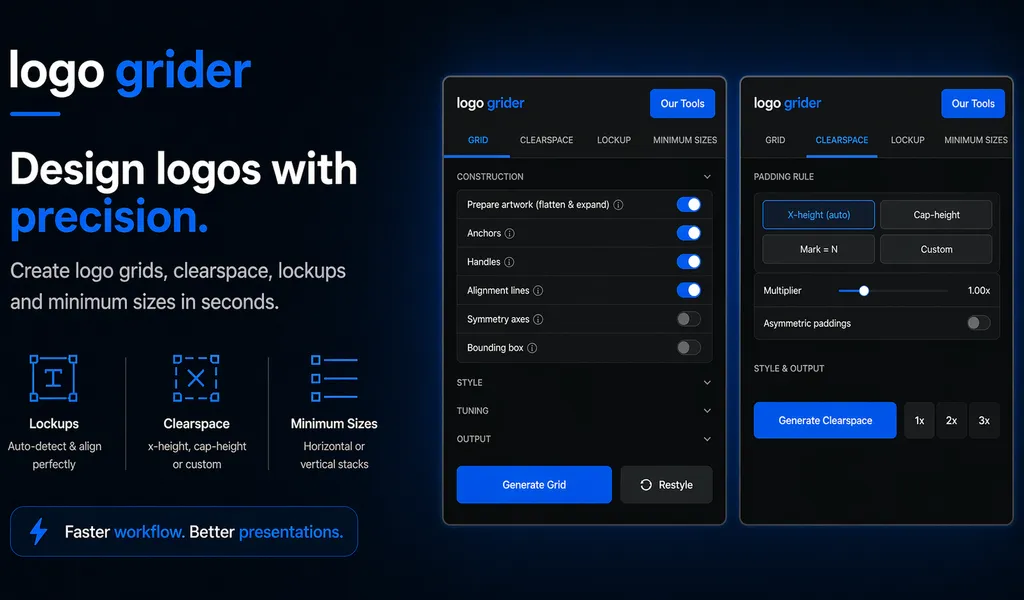
Build logo grids, clear space rules, lockups, and minimum size systems in seconds. Logo Grider is a powerful Illustrator panel for logo designers.
Build logo grids, clearspace, and size systems in seconds with this simple Adobe Illustrator plugin.

Logo Grider is a clean and easy-to-use Adobe Illustrator extension made for logo designers and branding work. It helps you quickly create logo grids, clearspace rules, lockups, and minimum size previews without doing everything manually.

As a logo grid generator and illustrator plugin for logos, it simplifies your workflow and saves time. You can build accurate logo spacing grids, define clearspace using x-height or custom values, and present your work in a clear, structured way.

This tool is perfect for creating brand guidelines, client presentations, and portfolio case studies. If you want a faster and more consistent logo design workflow, Logo Grider gives you the structure you need—without overcomplicating the process.
Key Features
- Logo Gridding: Generate clean vector grids, geometric arcs, and symmetry indicators.
- Clearspace Boundaries: Define safety zones using relative dimensions (X-height or Cap-height).
- Proportional Lockups: Align icon marks with text headers using mathematically correct gutters.
- Guideline Spacers: Show 1X, 2X, and 3X padding markers for style guide pages.
- Minimum Size Layouts: Preview and render minimum size indicators for horizontal and vertical variations.
Compatibility
- Adobe Illustrator CC 2022 (v26.0) or newer
- Windows 10+ and macOS 10.15+ (Apple Silicon supported)
Frequently Asked Questions
What is clearspace generation?
Logo Grider measures the x-height, cap-height, or custom boundary offsets of your logo and generates standard visual guides to show safety zones.
Does it support horizontal and vertical lockups?
Yes, it provides automated spacing templates to build both horizontal and vertical lockups with exact pixel distributions.
Is there a commercial license?
The purchase price ($30) includes a personal and commercial license to use the panel on client logo deliverables.
Related Panels
GridMaster
Create precise, professional vector layouts in seconds. GridMaster generates column, modular, baseline, and composition grids in Illustrator.
ColorLens
Generate palettes, check WCAG contrast, extract image colors, and export specification sheets directly inside Adobe Illustrator with ColorLens.
Tutorials & Guides
How to Calculate Logo Clear Space: Spacing Ratios, Safety Zones & Exclusion Rules
Master logo clear space math. Technical guide covering x-height formulas, exclusion zones, safe areas, vector margins, and automated Illustrator tools.
How to Create Layout Grids in Adobe Illustrator: Column, Modular & Baseline Systems
Master Illustrator layout grids. A complete technical guide covering 12-column grids, modular design, baseline grids, grid lines, and GridMaster automation.